.mny database
Performs the real MSISAM header de-masking and per-page decryption locally. No guessing, no cracking. This version has no password entry: in our validation, Money 2001 files carrying a password opened without one; a file that genuinely needs its password is reported and not opened.
Looking for a Microsoft Money alternative? Read this first.
Get your financial history back out of .mny.
Searching for a Microsoft Money alternative? Microsoft Money Rescue is not one — it doesn’t budget, reconcile or track anything going forward. It does one thing: it opens an old, discontinued .mny file, read-only, and gets your data out — once — into formats live finance apps like Quicken, GnuCash, HomeBank and Moneydance can import. Password on the file? In our testing, a password-protected Money 2001 file opened without its password. A file that genuinely requires one is reported plainly rather than guessed at.
Microsoft Money was discontinued in 2009, and it doesn’t run on modern
systems. The .mny files it left behind still hold years of
your life — accounts, transaction registers, investments, budgets.
Microsoft Money Rescue reads them locally, read-only,
performing the real MSISAM decryption itself — no copy of Money needed —
and exports your data straight into Quicken, GnuCash and Excel (QIF, OFX, CSV).
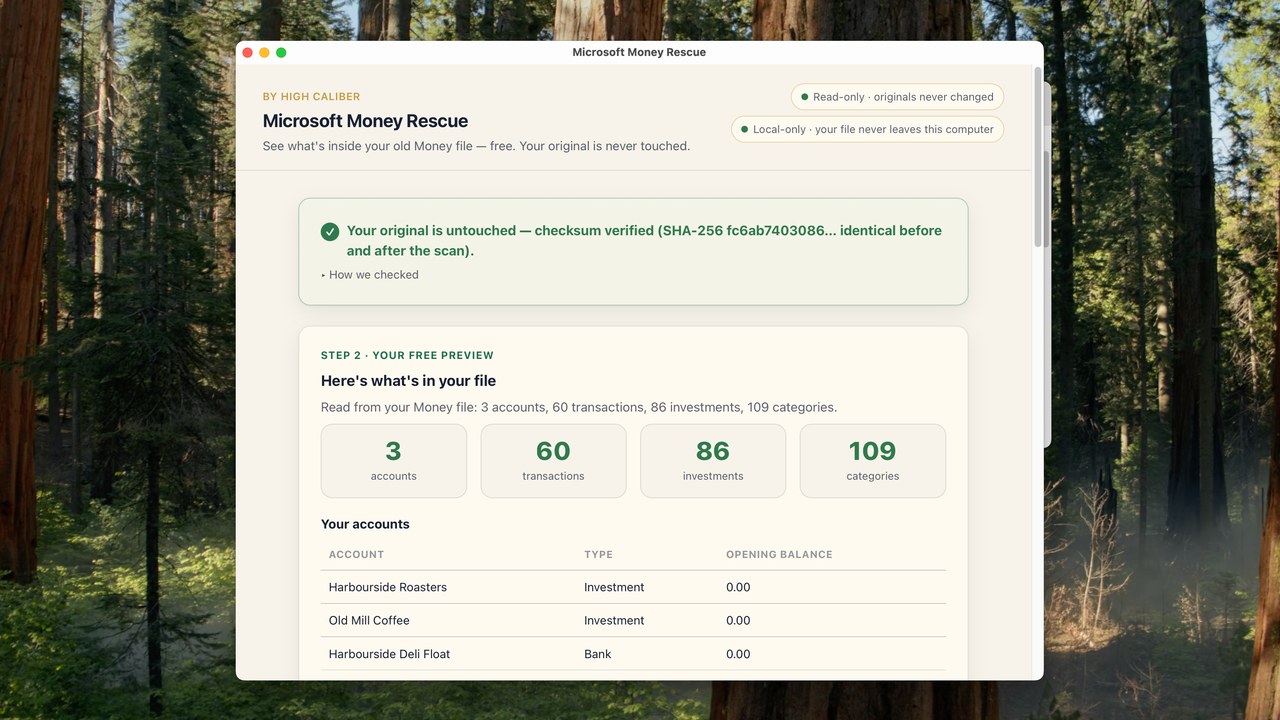
- Your original
.mnyis never changed — opened read-only - Runs on your computer — nothing uploaded, no account
- Buy once — no subscription to read your own records
One of High Caliber’s local, read-only recovery tools.
Recovers Money 2001 through Money Plus 2008 files. £39 one-time.
The problem
The app went away in 2009. Your records didn’t.
Millions of households ran their money through Microsoft Money in the 1990s
and 2000s. When it was discontinued, the .mny files stayed behind
on hard drives and backup discs — a proprietary, encrypted Jet/MSISAM database
that nothing modern opens. The history inside is exactly what a tax question,
an estate matter, or a simple “what did we pay for that house?” needs.
Microsoft Money Rescue exists so those records are never trapped.
Microsoft’s free Money Plus Sunset edition still opens .mny on Windows if you have a copy. Money Rescue is for everyone who doesn’t — Mac or Windows — and for the file Sunset won’t open.
Reads onlyYour source file is opened as an input and never written back to — including its modification time — even on corrupt files.
Local by designIt runs entirely on your computer. Financial data is sensitive; nothing is uploaded and no account is needed.
Real decryption, no Money installIt decodes the .mny file’s MSISAM page format directly — it does not need Microsoft Money installed, which is the point.
How it works
Choose the file, see what’s inside, then export.
What the tool actually does: read an old .mny file locally, recover your records, and leave the original untouched. Captions on — no sound needed.
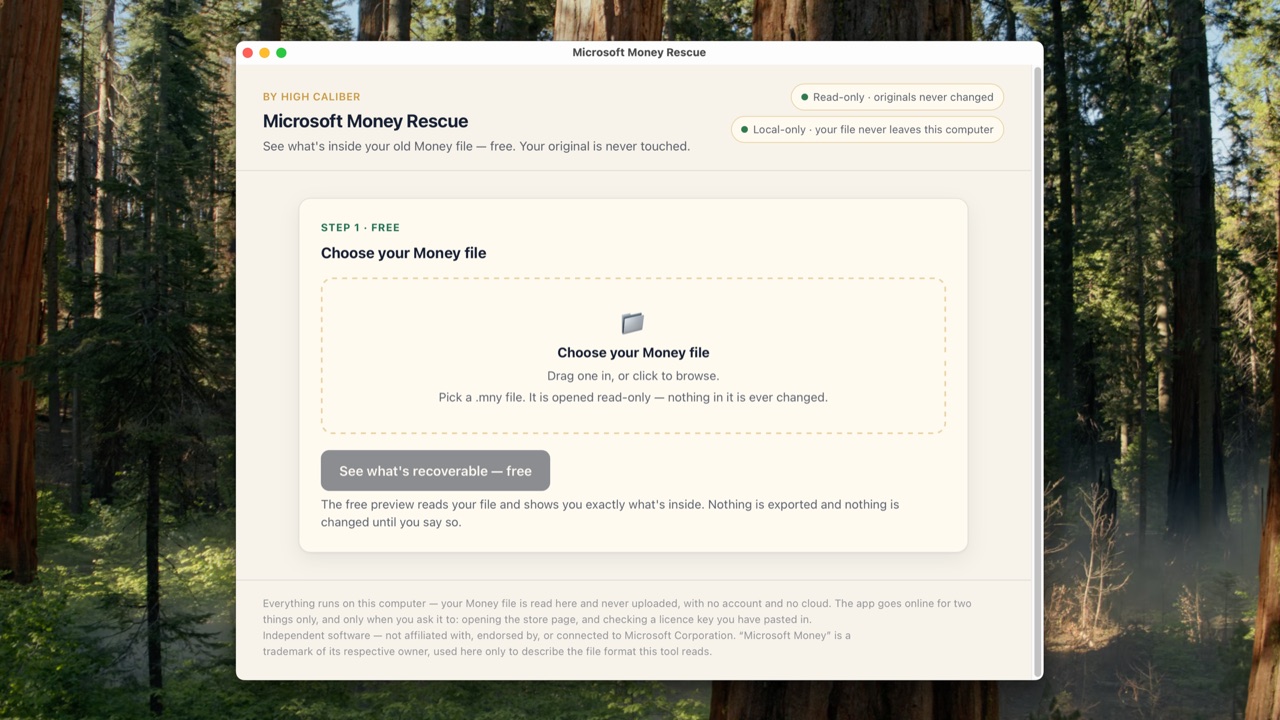
Microsoft Money Rescue — by High Caliber. An animated overview of the recovery flow — not a screen recording. Your original file is only ever read, never changed.
What it actually recovers
Real parsing of the real format.
A .mny file is a Microsoft Jet/MSISAM database — encrypted,
and not a standard Access or SQLite file. Microsoft Money Rescue de-masks the header
and decrypts each page itself, in a pure local engine. Everything below is
what the tool does today — not a roadmap.
It recovers Money 2001 through Money Plus 2008 — the accounts, the transaction ledger, the securities list and the full category tree — decrypting both the legacy scheme (Money 2001) and the modern scheme (Money 2002–2008). Money 2000 isn’t supported (see the scope table below).
Your files stay yours
Comfort and control, built into how it works.
These aren’t marketing lines — they’re properties of the code, built into how it runs.
Read-only on your originalThe source file is opened read-only and never rewritten — including its modification time — on both healthy and corrupt files.
Nothing uploadedRecovery runs entirely on your own computer. No upload, no account, no cloud.
No lock-in, no crackingThe exports are open formats you can take anywhere — QIF, OFX, CSV and JSON. It opens files you own — it performs no password cracking and no DRM bypass.
Scope & compatibility
What it recovers — and what it honestly doesn’t.
What it does and what it doesn’t, side by side — so there are no surprises.
Recovers today
Money 2001 → Money Plus 2008.mny files (legacy & modern encryption)
Accounts — name, type, opening balance
Transactions — date, amount, memo, cleared status, payee/category links
Securities — name, ticker, last price · Categories — full income/expense tree
Password-protected files — this version has nowhere to enter one; see the FAQ
Export → QIF · OFX · CSV (Quicken, GnuCash, Excel) + JSON recovery report
Not recovered
Money 2000 — not supported Split-transaction detail lines — not decoded Per-holding investment quantities and payee postal addresses — not decoded Investment positions/trades — investment accounts export as cash ledgers in QIF Currency handles are not resolved to ISO codes — supply a currency for OFX if not USDVersion scope, plainly: Money 2001 through Money Plus 2008 are recovered. A Money 2000 file isn’t supported. If Microsoft Money Rescue can’t open a file — or it’s damaged beyond reading — it says so plainly and stops. It will never guess at your finances, and your original is untouched either way.
Why now
There’s no countdown. There’s just an old drive with your history on it.
Microsoft Money was discontinued in 2009
The .mny files still on your drives may be the only copy of that history
The risk isn’t a ticking clock on this page — it’s an ordinary day when the old PC won’t boot, or the backup disc is the only place the file exists. Records people suddenly need for tax, probate or a mortgage question are painful and expensive to reconstruct from bank statements. The sensible move is simply to get the data out into an open format while the file is still healthy. We’d rather you export early and never need us than lose the records.
Free and manual options included, not just ours — read the Microsoft Money file guides: How to convert a .mny file to CSV · How to open a .mny file · What to use instead of Microsoft Money · When a .mny file will not open · Moving your Money data into Quicken or GnuCash.
See it work on your own files first
Check what’s recoverable before you pay a penny.
Download Microsoft Money Rescue and open one of your own .mny files. Without a licence it runs a
free preview: it opens the file and shows you the accounts and transactions it can read, on screen, and confirms your original was opened
read-only and left unchanged. Saving that out to files is what the licence
unlocks — everything you can see on screen stays free.
So you can find out whether it handles your files before deciding — and if it doesn’t do what this page says for your files, there’s a 14-day refund.
Download the free preview
Buy a licence — £39
Windows 10 and 11 (64-bit) · macOS 10.15 or later on Intel and Apple silicon · code-signed, and notarised by Apple on the Mac
Pricing
£39 one-time. Yours to keep.
Microsoft Money Rescue is a one-time purchase, in keeping with every High Caliber recovery tool — pay once, yours to keep, no subscription, ever, for reading your own records. Licence for one person on up to three computers — for example your Mac and your PC, or work and home. Email support@highcaliberapplications.com to move it.
Microsoft Money Rescue
£39 one-time · three computers
Retyping years of transactions, or £39 once for QIF, OFX and CSV.
Recover your accounts, full transaction ledger, securities and categories from your own .mny files (Money 2001 – Money Plus 2008) and export them straight into Quicken, GnuCash and Excel (QIF, OFX, CSV), with honest integrity notes on every run. Buy once, yours forever — and you’ll be able to preview what’s inside a file before paying.
14-day money-back guarantee: if it doesn’t do what this page says for your files, email support@highcaliberapplications.com within 14 days and we’ll refund you in full. Prefer to check first? Run the free preview on your own file before you buy.
FAQ
Straight answers.
Can I buy and download it now?
Yes. Microsoft Money Rescue is on sale at £39 as a one-time purchase, and the Windows and Mac apps are both available to download straight away — one purchase covers both. Run the free preview on one of your own .mny files first — it shows you on screen what it can read, and saving that out to CSV and JSON is what the licence unlocks.
Will it change my original .mny file?
No. It opens your file read-only — to read it, never to write to it — leaving the source (including its modification time) untouched on healthy and corrupt files alike, and exports are always written to a separate location you choose.
Does it upload my financial data anywhere?
No. It’s a local desktop tool: recovery runs entirely on your own computer, with no upload and no account. Financial records are exactly the kind of data that should never leave your machine.
Do I need Microsoft Money installed?
No — and that’s the point. Microsoft Money Rescue decodes the .mny file’s internal Jet/MSISAM database format directly, including the decryption, so it works on machines where Money never ran and can’t run.
My file is password-protected. Can it open it?
Sometimes, and we would rather be straight with you about which. This version has no password entry. In our own validation, Money 2001 files carrying a password opened without one being needed; a file that genuinely requires its password is reported clearly and not opened. If yours is one of those, run the free preview first — and the 14-day refund stands either way. It performs no password guessing and no cracking.
Which Money versions are supported?
Money 2001 through Money Plus 2008 — it decrypts both the legacy scheme (Money 2001) and the modern scheme (Money 2002–2008). Money 2000 isn’t supported. If a file can’t be opened, that’s reported plainly rather than guessed at.
Can I move my data into Quicken, GnuCash or Excel?
Yes. Microsoft Money Rescue exports your data as QIF, OFX and CSV: QIF imports into Quicken, GnuCash, HomeBank, Moneydance and most desktop finance apps; OFX (1.02) suits banking software; CSV opens in Excel or any spreadsheet. A structured JSON recovery report is written alongside. Honest scope: investment positions/trades aren’t recovered, so investment accounts export as cash ledgers in QIF; and Money’s currency table isn’t decoded, so you can supply a currency code for OFX if your file isn’t in USD.
What exactly comes out?
Your accounts (name, type, opening balance), every transaction (date, amount, memo, cleared status, payee and category links), your securities (name, ticker, last price), the full income/expense category tree, and your payee directory — exported as QIF, OFX and CSV plus a structured JSON recovery report, with integrity notes stating exactly what was and wasn’t recovered.
Is this a Microsoft product?
No. It’s independent and not affiliated with, endorsed by, or connected to Microsoft Corporation. “Microsoft” and “Microsoft Money” are trademarks of their owner, used here only to describe the file format this tool reads.
Independent — not affiliated with Microsoft. Microsoft Money Rescue is an independent recovery tool. It is not affiliated with, endorsed by, sponsored by, or connected to Microsoft Corporation. “Microsoft” and "Microsoft Money" are trademarks of Microsoft Corporation, referenced here solely to describe the file format this tool reads (nominative use). Microsoft Money is a discontinued product; this page states that as honest context and creates no false urgency. The tool works only with files you already own and have the right to access. This version cannot open a file that genuinely requires its password: such a file is reported and left unopened. It performs no password cracking, DRM removal, or circumvention of technical protection. All product and file-format names are the property of their respective owners.