
Stop typing transactions in by hand
Turn whole statements into date, description, money in, money out and balance.
PDF bank statement to CSV · Mac and Windows
Date, description, money in, money out and balance — checked against the statement’s running balance, entirely on your own computer.
Nothing to upload — there is no server that ever sees a transaction, a balance or a name.
Free trial first · then £59, one payment
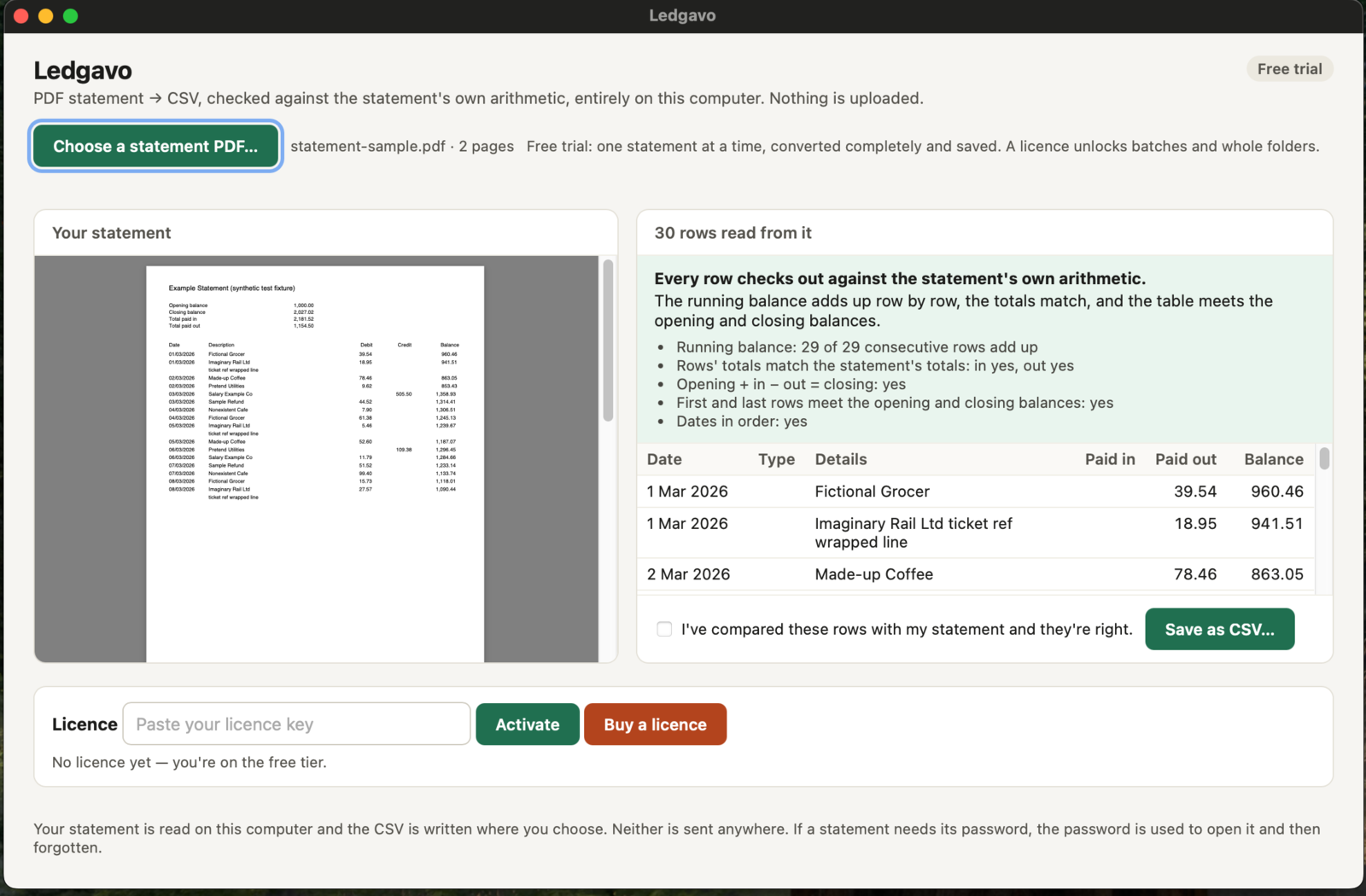
From PDF to rows
Turn whole statements into date, description, money in, money out and balance.
Ledgavo finds the header line and works out the columns from your own statement, on your machine.
Export-to-CSV from the bank only goes back so far — the older months are PDF or nothing.
Three steps
Open one PDF statement. With a licence, do a whole folder at once.
Statement on the left, rows on the right, verdict in plain words. If it can’t be sure, Ledgavo asks you to compare before saving.
Date, description, money in, money out and balance — ready for anything that imports CSV.
Rows that add up
The free trial does the full job on one statement per run — no watermark, no cut-down rows.
Where the statement carries a running balance, every row is checked against it, first to last; a statement that adds up is marked as such, one that doesn’t is never quietly saved.
There is no list of supported banks to be on; it finds the header line and works out the columns from your own statement, on your machine. The free trial is where you see it read yours before you pay.
Multi-page statements read as one table.
Type the password your bank set; used to open the PDF, then gone; never written down, never sent.
With a licence, get a CSV for each statement. Password-protected files in a folder are skipped and named so you can do them one at a time.
Excel, Numbers, Google Sheets, Xero, QuickBooks, FreeAgent, anything that imports CSV.
Private by design
Nothing to upload — there is no server that ever sees a transaction, a balance or a name.
The licence key check when you activate. Your statements are never part of that.
Your PDF is never changed.
Never written down, never sent.
Who it’s for
With a client’s year of statements as twelve PDFs.
Doing their own books, or getting ready for the accountant.
Reconciling rent against the statement.
The bank’s CSV export stops at a few months back; the PDFs go back years.
Try before you buy
The free trial does the full job on one statement per run — no watermark, no cut-down rows. A licence — £59 — adds batches and whole folders.
Download the free trialYour statement stays on your device.
One payment, any number of statements, nothing uploaded.
Checkout by Lemon Squeezy · VAT included.
Licence for one person on up to three computers — for example your Mac and your PC, or work and home. Email support@highcaliberapplications.com to move it.
Works on digital PDFs — the kind your bank produces. Scanned or photographed statements aren't read in this version. Tested so far on our own statements from one UK bank, all of which reconciled; other banks' layouts are learned from your statement, and the free trial is the way to see yours before you pay.